Data Forecast Module Design

A B2B forecasting dashboard that helps teams understand future business metrics from past data.

0 → 1

B2B · SaaS

Lean UX

Predictive Analytics

Data Visualization
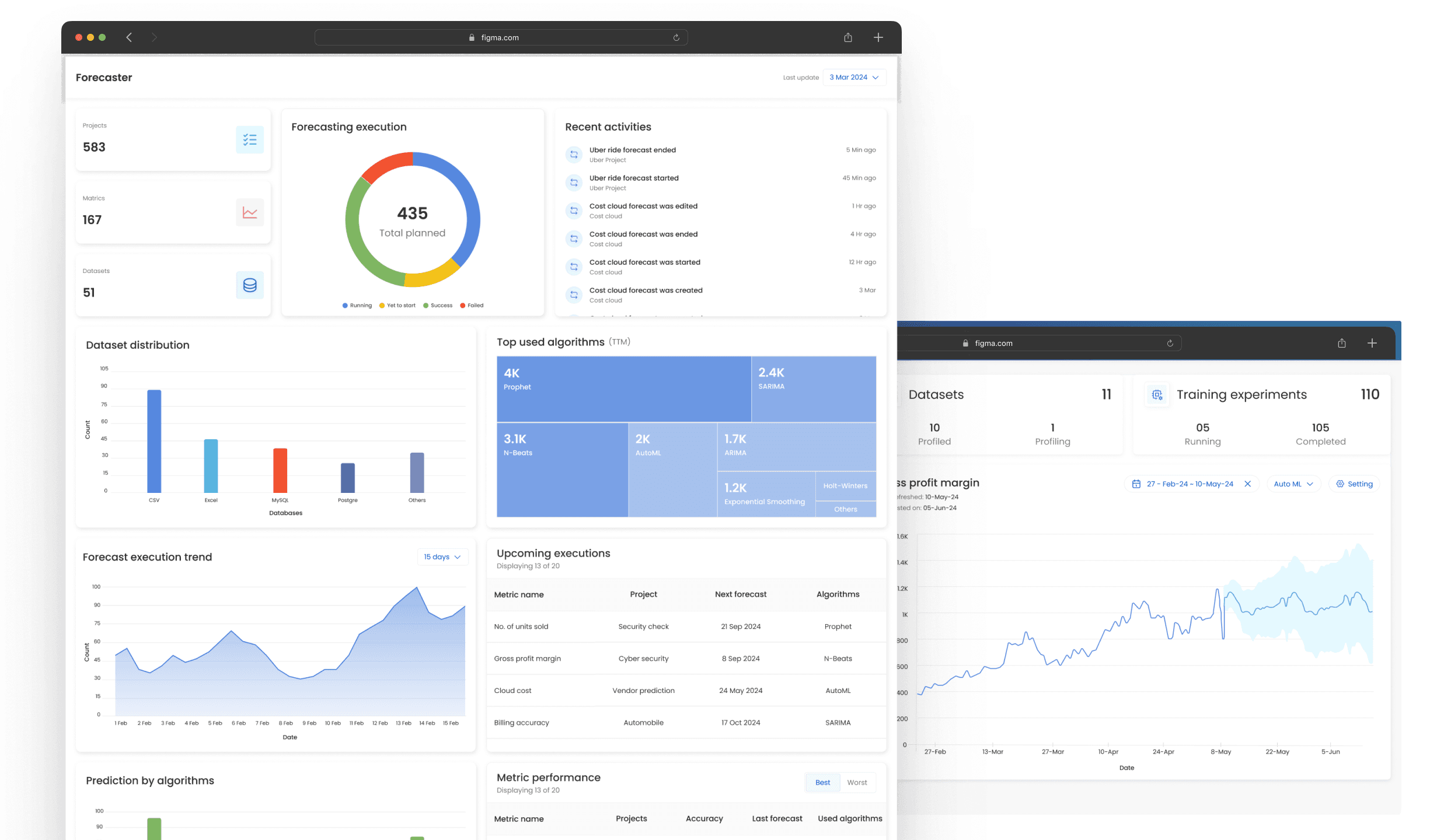
In a startup, winning early clients is everything. I designed a V1.0 forecasting module in two weeks to help the sales team show complex ML predictions through a clear, demo-ready interface.

The goal was not to design the entire product. The goal was to design the proof.

Project Overview

Forecaster is a predictive analytics platform that uses historical data and machine learning to forecast future business metrics. It helps teams in marketing, sales, operations, and analytics anticipate trends and make data-driven decisions.

Role

Lead Product Designer (solo)

Duration

2 weeks

Context

Startup, V1.0 product build

Platform

Desktop web app

Problem

The startup had strong predictive technology in the backend, but no simple way to show its value to prospective clients. Raw data, backend workflows, and algorithm outputs were too technical for a live demo.

The design challenge was to make complex forecasting feel simple, credible, and useful for non-technical business users.

Outcome

Shipped in 2 weeks

Delivered a high-fidelity, demo-ready MVP solo, under a hard deadline tied to upcoming client meetings.

Foundation for V1.0

Set the layout, visual hierarchy, and dashboard patterns the team built the V1.0 product on.

From ML claim to credible demo

Gave leadership and sales a visual module that turned an abstract "we predict your metrics with ML" pitch into something prospects could see and trust.
Requirements

The design needed to support two core workflows:

High-level monitoring

Dashboard for managers to understand forecast health across the company at a glance: how many forecasts are running, how they are performing, and where the bottlenecks are.

Detailed analysis

A focused view for users who need to inspect a single metric: its history, its forecast, the uncertainty around it, and the controls to adjust the model.

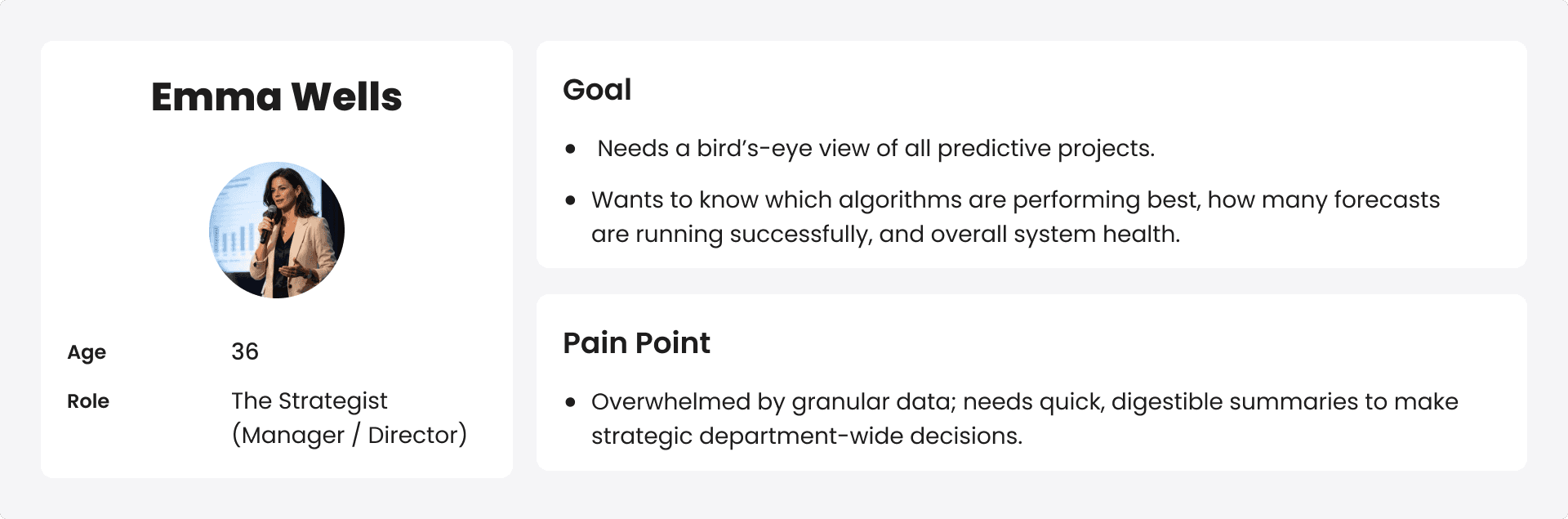
Target Users

I defined two proto-personas based on stakeholder, data science, and sales input.

Design Process

With only two weeks, I followed a Lean UX process built on fast learning, quick alignment, and rapid iteration.

1 · Kickoff – setting the scope

Brief & internal discussion The leadership ask was specific: sales needed something to show prospects within two weeks that made the claim "we predict your business metrics with ML" feel real and trustworthy. That set the direction – demo-first, not feature-complete.

This also meant deciding what not to build. I deliberately left out account settings, data-upload flows, model configuration, and onboarding – anything a prospect wouldn't see in a demo – so the two weeks went entirely into the two screens that carried the story.

This let me design the dashboard around the actual system instead of inventing stats. The top-level cards for Metrics, Datasets, and Training Experiments came straight from how the product worked behind the scenes.

2 · Discovery

With no time for a full external study, I ran lean internal research. I spoke with the product lead, data scientists, and sales team to understand what prospects cared about in demos, where they got confused, and what information needed to be visible first.

The sales team shared one recurring prospect concern:

"How do we know this forecast is reliable and not just a black-box prediction?"

This reframed the problem. The job wasn't only "see a prediction" — it was "trust a prediction enough to act on it.”

Key insight

Non-technical buyers don't distrust a forecast only because it might be wrong. They distrust it when it looks like a single "magic number" with no reasoning or uncertainty behind it. Showing uncertainty honestly builds more trust than hiding it.

This one insight drove the most important design decision in the project – the shaded confidence band on the forecast – and I'll come back to it in the final solution.

3 · Competitive Analysis

I reviewed analytics dashboards and forecasting tools for how they handled forecast visualization and dashboard density.

  • Tableau / Power BI – powerful, but visually dense and built for analysts. A non-technical buyer gets lost.

  • Specialized forec`asting tools – used a familiar pattern: historical data as a solid line, then a forecast with a shaded range. Credible to data people, simple for managers. I adopted it on purpose rather than inventing something new.

  • Generic SaaS dashboards – confirmed the metric-cards + hero-chart + supporting-widgets layout as an easy, scannable pattern people already know.

The takeaway: our edge wasn't more complexity, it was clarity.

The design had to feel approachable to business users while staying credible to data teams.

4 · Documentation Study

Because the product was algorithm-heavy, I learned the domain before designing – what each algorithm is for (Prophet, SARIMA, N-Beats, AutoML, and others) and the system's real terminology ("Training experiments," "Profiled / Profiling," "Forecasted on").

Using the right language kept the UI credible to the engineers and data scientists in the demo room.

5 · Data Clustering

Before designing, I grouped the raw product data into a content model – sorting each element into a theme, defining its primary measure, and deciding what supporting detail belonged with it.

This content model became the information architecture for both screens: it decided what earned a summary card, a chart, or a table. Every block on the final dashboard traces back to a group defined here.

6 · Mid-Fidelity

I wireframed both screens in grayscale to lock the structure before visual polish.

I intentionally over-included tables at this stage, giving stakeholders concrete content to react to. Their feedback shaped what each data group should become – card, chart, table, or trend and set up the next checkpoint.

7 · Key Iteration: From Database to Story

Reviewing the mid-fi dashboard, stakeholders found it too table-heavy – it "looked like a database, not a story." This was exactly the failure mode I needed to avoid for non-technical buyers.

The pivot: cut dense tables and replace them with scannable visuals.

  • Converted most supporting tables into charts – Dataset Distribution to a bar chart, Prediction by Algorithms to a stacked bar, Forecast Execution Trend to an area chart, Forecasting Execution to a status donut.

  • Turned Top Used Algorithms into a treemap – the headline change – using part-to-whole encoding so block size shows usage at a glance, no reading required.

  • Kept only the two tables that genuinely needed row-level detail: Upcoming Executions and Metric Performance.

This was the Lean UX loop working as intended: build quickly, review with stakeholders, learn, simplify fast.

Final Solution

Two high-impact screens, one for each persona. Rather than walk through every widget, here are the decisions that took judgment.

1. Managerial Dashboard – for The Strategist

  1. Health first (progressive disclosure). Summary cards and the execution donut sit on top, so a manager reads system status in the first second. Detail tables drop below the fold.

  2. Dense tables became visuals. Several tables became charts (bar, stacked bar, area); the headline change was turning "Top Used Algorithms" into a treemap where size shows usage at a glance. This is what turned a "database" into a "story."

  3. Anchored to the real system. Projects, Metrics, and Datasets map to how the product actually works – so data teams recognized their own system and the numbers felt earned, not invented.

2. Forecast Deep-Dive – for The Analyst

  1. Kept the analyst in context. A searchable metric list, plus date-range, AutoML, and Settings docked above the chart, let the analyst switch metrics and tune the forecast without ever leaving the view.

  2. Uncertainty as a trust mechanism. History flows into a shaded confidence band that widens over time – honest uncertainty that makes the forecast feel trustworthy, not a black box.

Key Learnings
  1. Designing for data density. I learned to balance a large amount of quantitative data with a calm interface. Not every data point deserves equal weight – good dashboard design is mostly deciding what users need first.

  2. Speed vs. perfection. The two-week clock forced me to prioritize the core demo workflows, lean on stakeholder alignment, and iterate fast instead of polishing every edge case.

  3. Designing with the algorithm in mind. Working with the data science team taught me to design around how the models actually behave – which is why the confidence band widens over time rather than staying flat. Understanding the system made the interface more honest.

Interested in Connecting?

Let’s talk opportunities, collaborations, or anything design!

© 2026 Ashlesha. All rights reserved.