From Manual Cab Bookings to a Connected Mobility Platform

Turning manual cab operations into a connected mobile app and admin dashboard

0 → 1

B2B · B2C

Mobility

Project Overview

Golden Monkey Cab Service operated entirely through Google Calendar, Excel sheets, and phone calls. As the business grew, this created gaps in booking visibility, vehicle tracking, and dispatch management. 

I was brought in to design a connected digital service – a mobile app for riders and a dashboard for the operations team.

The goal was to help riders book and manage trips more easily, while giving the business one place to track bookings, vehicles, drivers, customers, and service activity.

I owned the User Mobile App and Admin Web Dashboard. The Driver App was handled by another designer.

Role

UX Designer

Duration

3 Months

Team

• 2 UX Designers

• 3 Engineers

Platform

• Mobile App

• Desktop web app

Important Context & Constraints

Golden Monkey was not redesigning an existing product. We were replacing a manual workflow, so the design had to work for both riders and the internal operations team.


A few constraints shaped the design direction:

Manual operations needed visibility

Bookings, vehicle availability, rider details, and trip status had to move from scattered tools into one connected system.

The rider app had to stay simple

The app needed clear home screen actions, guided suggestions, and a booking flow that worked for both quick rides and specific ride needs.

Admin workflows needed structure

The dashboard had to reduce back-and-forth communication and help the team monitor bookings, vehicles, drivers, customers, and service activity.

Impact 

Turned a manual booking workflow split across calendars, spreadsheets, and phone calls into one connected digital service – a single app for riders and a single dashboard for the operations team.

Design process

The design process followed two connected tracks: one focused on customer experience and the other focused on admin operations.

This helped me design the mobile app and dashboard as one connected service ecosystem instead of two separate products.

User Mobile App
Discovery & Research – User Mobile App

Before designing the rider app, I used interviews, a survey (N=32), and competitive analysis to understand what makes cab booking stressful and what riders need before confirming a trip.


This research track was specific to the User Mobile App. The goal was to define the user experience first: how users discover ride options, enter trip details, customize their ride, confirm booking information, track the driver, and feel safe throughout the journey.

1 · Research Goals

The research focused on four questions:

  1. What creates uncertainty while booking?

  2. What information do riders need before confirming?

  3. What ride preferences should be easy to add?

  4. How can the home screen guide users faster?

This helped me move from a generic cab booking idea to a more focused mobile experience: simple booking, clear ride status, flexible ride preferences, visible safety support, and helpful home screen suggestions.

2· Research Synthesis

The research showed that riders were not only looking for a way to book a cab. They needed the app to reduce uncertainty, guide them toward the right ride option, and make important information easy to understand before confirming a trip.

Across 32 surveyed riders, the strongest patterns were:

1. Riders wanted a simpler starting point (22 of 32)

2. Ride status needed to be clear at every step (26 of 32 wanted real-time tracking)

3. Specific ride needs should be easy to add, not hidden (18 of 32)

4. Safety and payment flexibility influenced trust (23 of 32 cared about safety; 19 of 32 wanted multiple payment options)


The design had to feel approachable to business users while staying credible to data teams.

These insights shaped the structure of the User Mobile App. I used them to define the home screen, booking flow, ride preference options, tracking experience, wallet, profile, and support-related features.

3 · Defining the User Mobile App

The information architecture translated research findings into a clear app structure. Instead of placing every feature on the home screen, I grouped the experience into core areas.

This helped define how riders would move from discovering ride options to booking, customizing, paying, tracking, and managing their trip after completion.

Wireframes

The goal was to make sure the app could support both quick ride booking and more specific needs like delivery, multiple stops, saved addresses, vehicle selection, payment, receipts, notifications, and profile settings.

Instead of focusing on visual polish, used wireframes to answer key product questions about the rider flow.

Final Mobile App Design & Prototype

High-fidelity designs and connected the screens into clickable prototypes. The goal was to show how the app would work as a real service experience. 

Book a Ride

A guided flow for choosing trip type, adding ride details, selecting preferences, paying, and receiving confirmation.

Design focus: Flexible booking without making the flow confusing.

Deliver Items

A package delivery flow that lets riders send or receive items using the same service system.

Design focus: Make package delivery feel like a natural extension of the ride-booking experience.

Rent a Vehicle

A planned rental flow for choosing vehicle type, driver option, trip timing, and payment.

Design focus: Make vehicle rental feel structured, flexible, and easy to complete.

Core Navigation & Account Management

A simple bottom navigation for bookings, wallet, profile, and post-booking management.

Design focus: Keep important actions organized and easy to access.

Web Admin Dashboard
Discovery & Research

I conducted whiteboarding sessions with internal stakeholders to understand the offline operations and map how bookings, drivers, vehicles, customers, payments, and reports were managed.

This helped me translate scattered manual processes into a clear set of dashboard requirements and admin workflows.

The information architecture helped turn the admin’s scattered responsibilities into a structured dashboard with clear modules and task-based workflows.

Iterating the Admin Dashboard

After mapping the dashboard structure, I moved into high-fidelity iterations for the core admin screens. The main design decision was to make each screen more task-focused, so admins could scan records, check status, and take action faster.

1) Driver Management

The first version showed driver information in a basic table, but it did not clearly separate active, pending, and approval-related tasks. I redesigned the screen with clearer status grouping, approval tabs, and stronger actions so admins could manage drivers faster.

2) Customer Management

The early customer detail screen felt too form-heavy and made important activity hard to scan. I reorganized it into a dashboard-style profile, so admins could quickly see customer details, booking history, payment activity, and notes in one place.

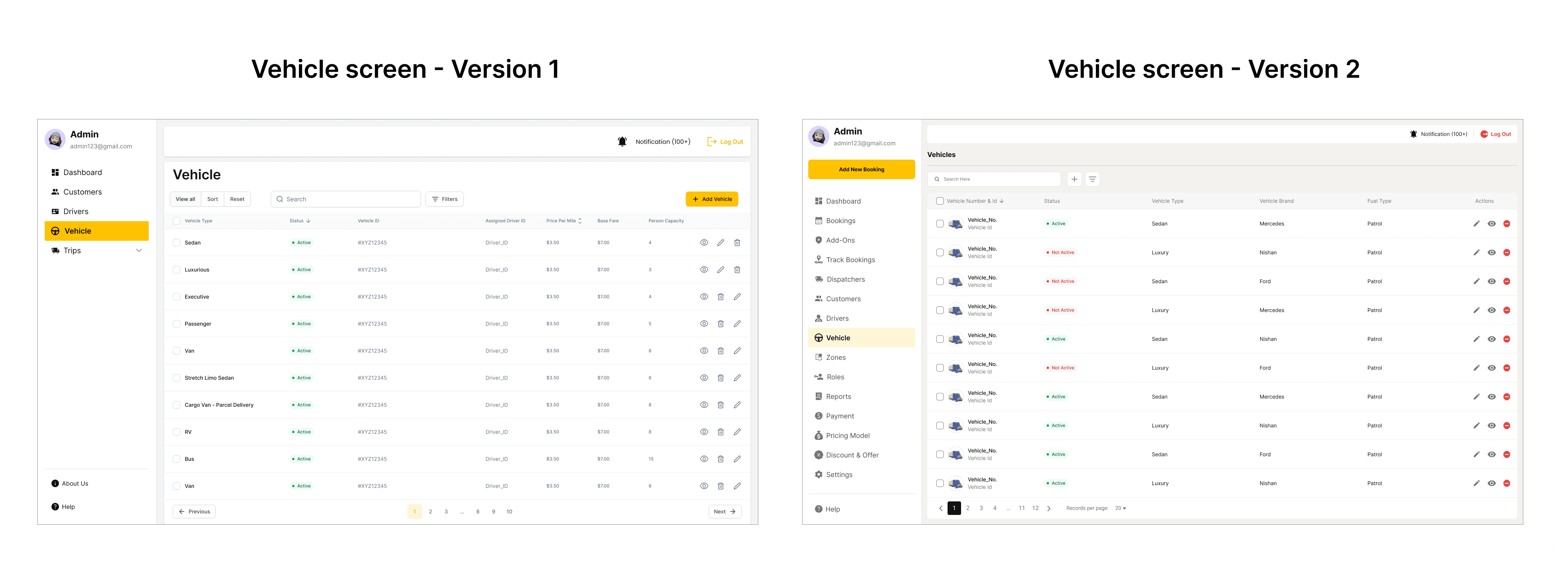
3) Vehicle Management

The first vehicle table had too many operational details competing for attention. I simplified the layout and prioritized the information admins needed first: vehicle status, type, brand, and key actions.

Final Admin Dashboard Prototype

Prototyped the final admin dashboard to show how daily operations could run from one connected system – creating bookings, assigning drivers, tracking rides, and managing records.


This helped the admin team understand the full workflow faster and reduced dependency on scattered manual tools.

Admin Dashboard – Full Walkthrough

Reflection

What worked. Treating the rider app and admin dashboard as two connected experiences shaped by their own evidence – and iterating the admin screens based on stakeholder feedback before handoff.

The gap. I validated the rider flows with stakeholders, not real riders. For an app meant to work across very different ride needs, that's the honest limitation.

What I'd do next. Run a moderated usability test of the booking flow with 5–6 riders, including elderly and assistive-device users, and iterate on what surfaces.

Key Learnings
  1. Designing one service across two platforms means designing for two very different mental models.


  2. The same action looks different to different users – for riders, booking is one tap; for admins, the same booking is tracking, assignment, vehicles, and payment.


  3. For products that replace manual systems, the workflow has to be designed before the screens.


  4. Good UX isn't just a clean app – it's also helping the business run better behind the scenes.

More Screens
Interested in Connecting?

Let’s talk opportunities, collaborations, or anything design!

© 2026 Ashlesha. All rights reserved.